Everyday planner · Ages 12–25

A clearer daily plan.More independence.

Fribli is a planner for autistic teenagers and young adults, those with ADHD, and anyone who needs a clear daily plan. School, everyday tasks and step-by-step guidance — prepared together with a parent.

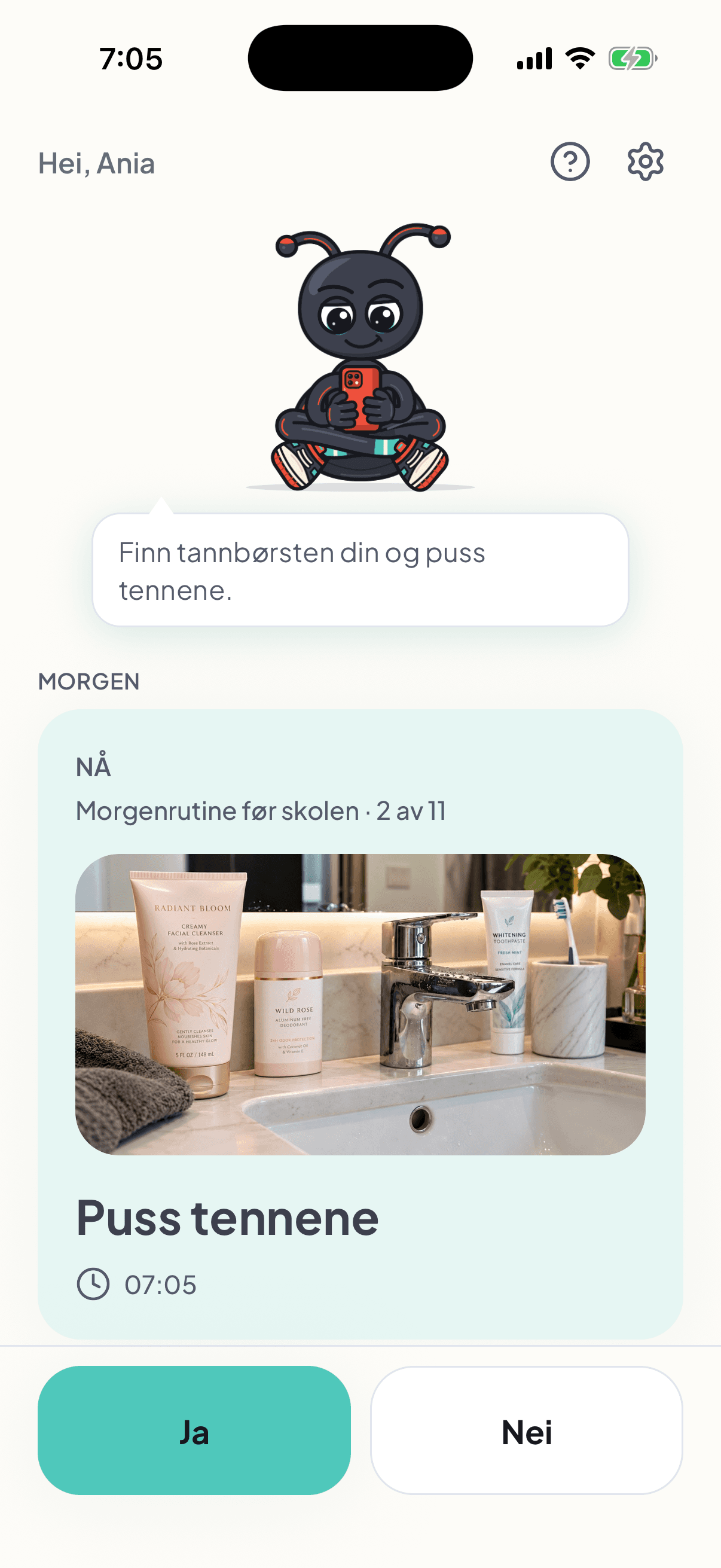
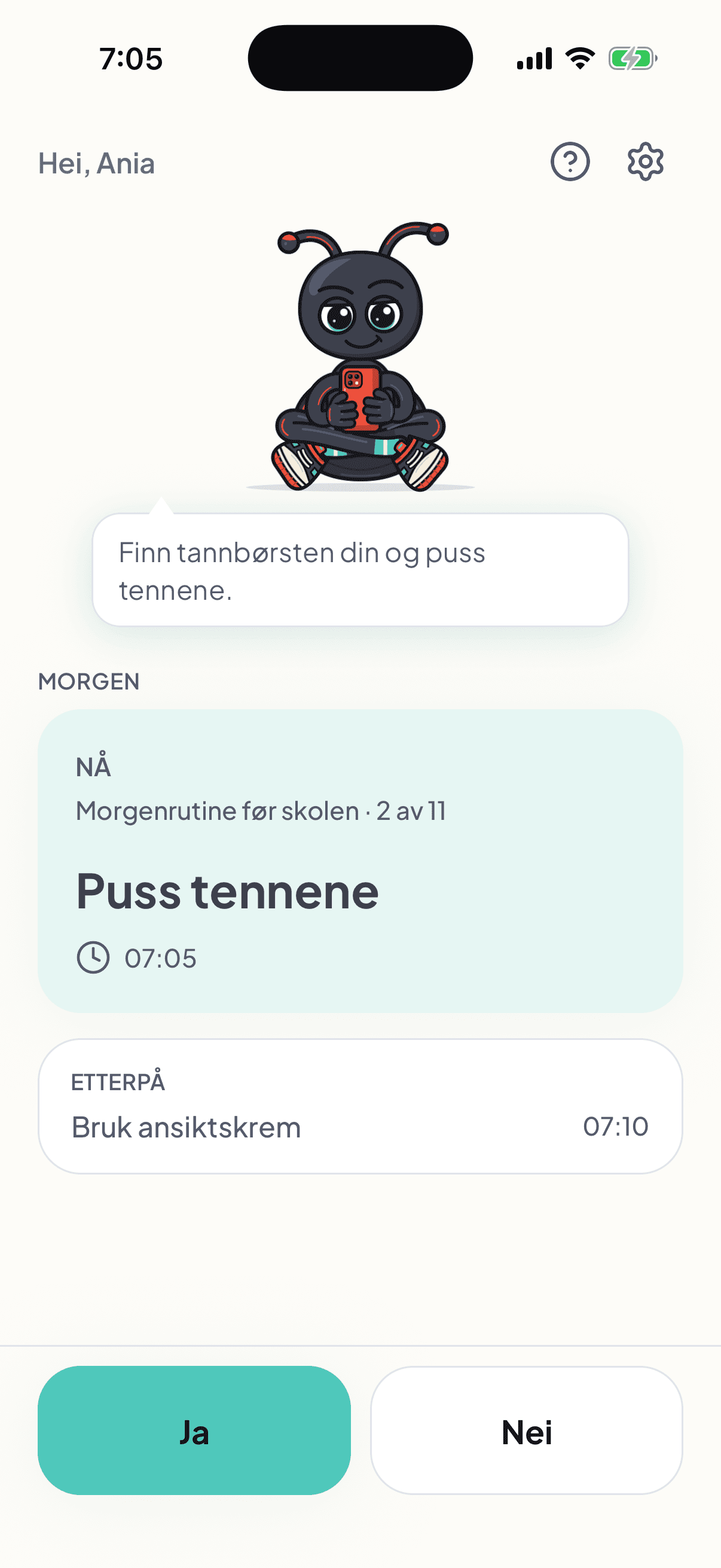
Ania’s Fribli screen: brush your teeth is the current step, with a message from the parent; use face cream comes next.

Created by a parent who knows how much preparation goes into just getting out the door.

Agreed together, separate phones

Two phones. One plan you agree on together.

The parent adds to and changes the plan on their own phone. Saved updates automatically reach the young person’s separate view on their phone. Together, you agree on what the plan should include.

On the parent’s phone

Prepare a plan that fits their needs.

Together, you agree on what help is useful. You prepare and approve the plan and guidance on your own phone.

  • Add activities and change times.
  • Choose words, photos and the number of steps.
  • Keep the school week in one place.
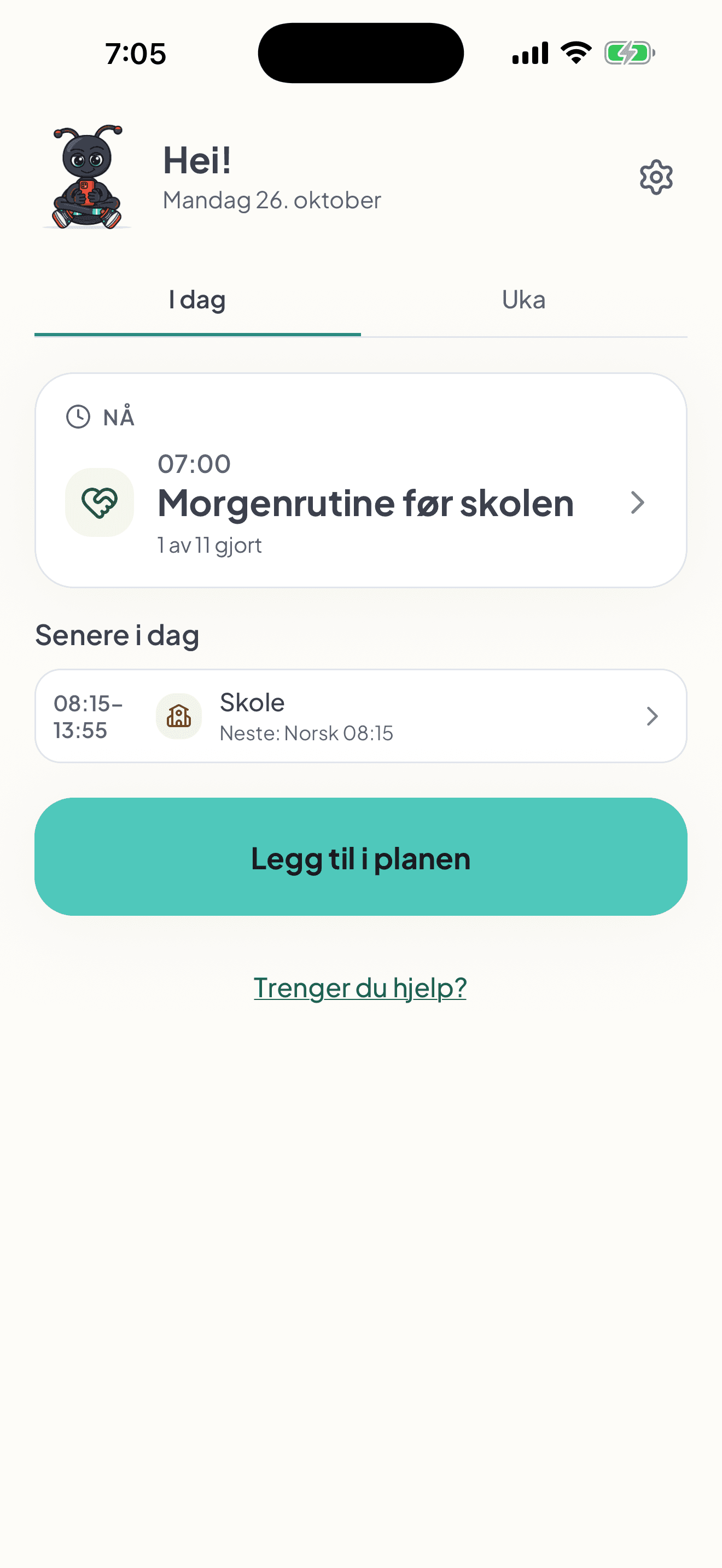
The parent’s dashboard for Monday 26 October, Today tab: the morning routine before school at 07:00 is happening now, 1 of 11 done. Later today: school from 08:15 to 13:55, next lesson Norwegian at 08:15.

On your phone

Your day. Your own view.

On your phone, check your plan and the updates your parent has saved. Keep information and guidance chosen for your needs close at hand.

  • Check your plan for today or tomorrow.
  • See school hours and homework.
  • Use step-by-step guidance when you need it.
Ania’s screen: brush your teeth is the current step, 2 of 11 in the morning routine before school, with a message from the parent. Use face cream at 07:10 comes next.

For parents · Less to enter by hand

Different moments. Support that fits your family.

Fribli helps you save time by suggesting steps from your description and reading school information from a photo. You adapt and approve the content, and your child has their own view with familiar words and photos.

“Do I have to enter the whole school week by hand?”

A photo of the timetable. Less to type.

Take a photo of the timetable or pick one from your gallery. Fribli suggests a plan; you check it and save.

  1. Add the photo

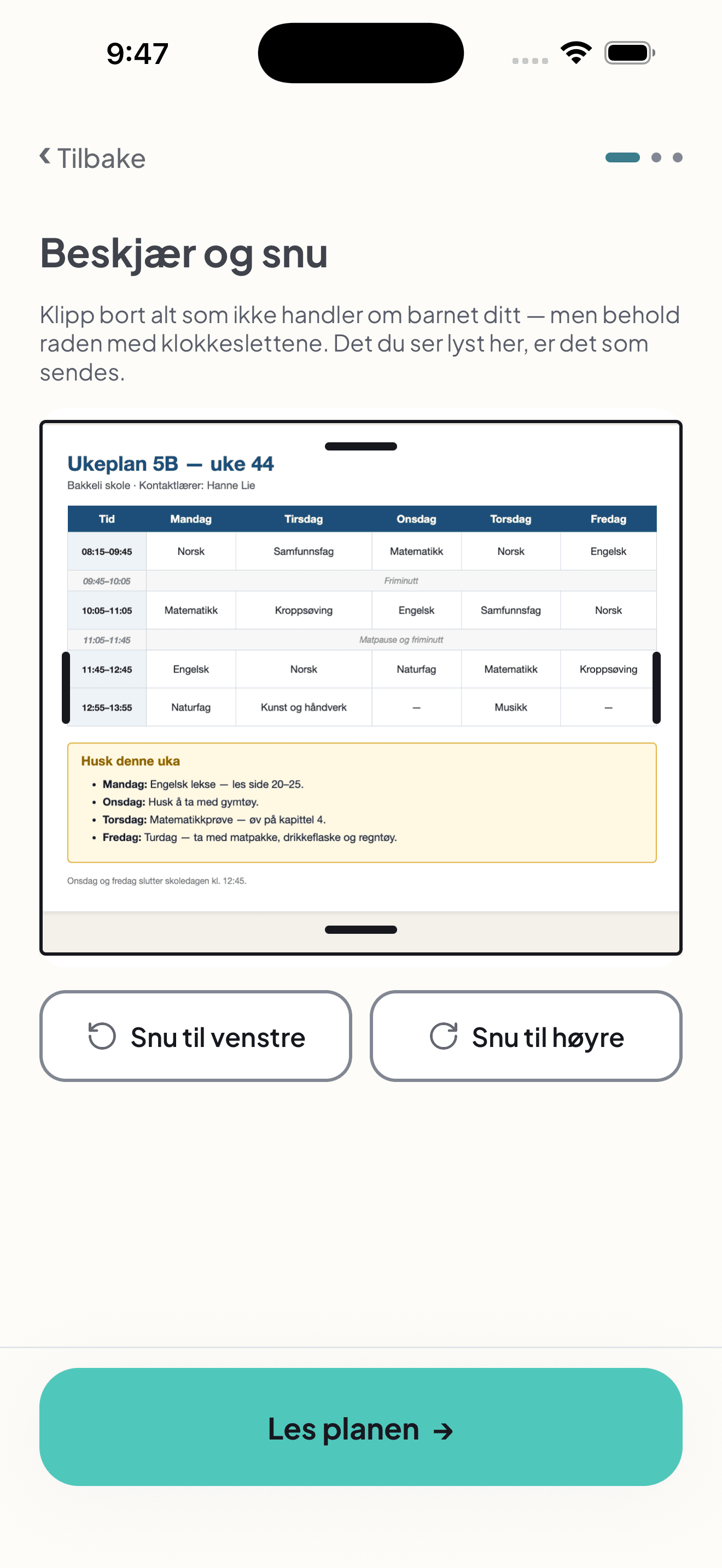
    Crop and rotate the photo to include what matters for your child. Keep the weekdays and times visible.

    Fribli’s Crop and rotate screen with a photo of class 5B’s timetable for week 44. The timetable, weekly notes, rotation buttons and Read the plan button are visible.
  2. See how Fribli sorts it

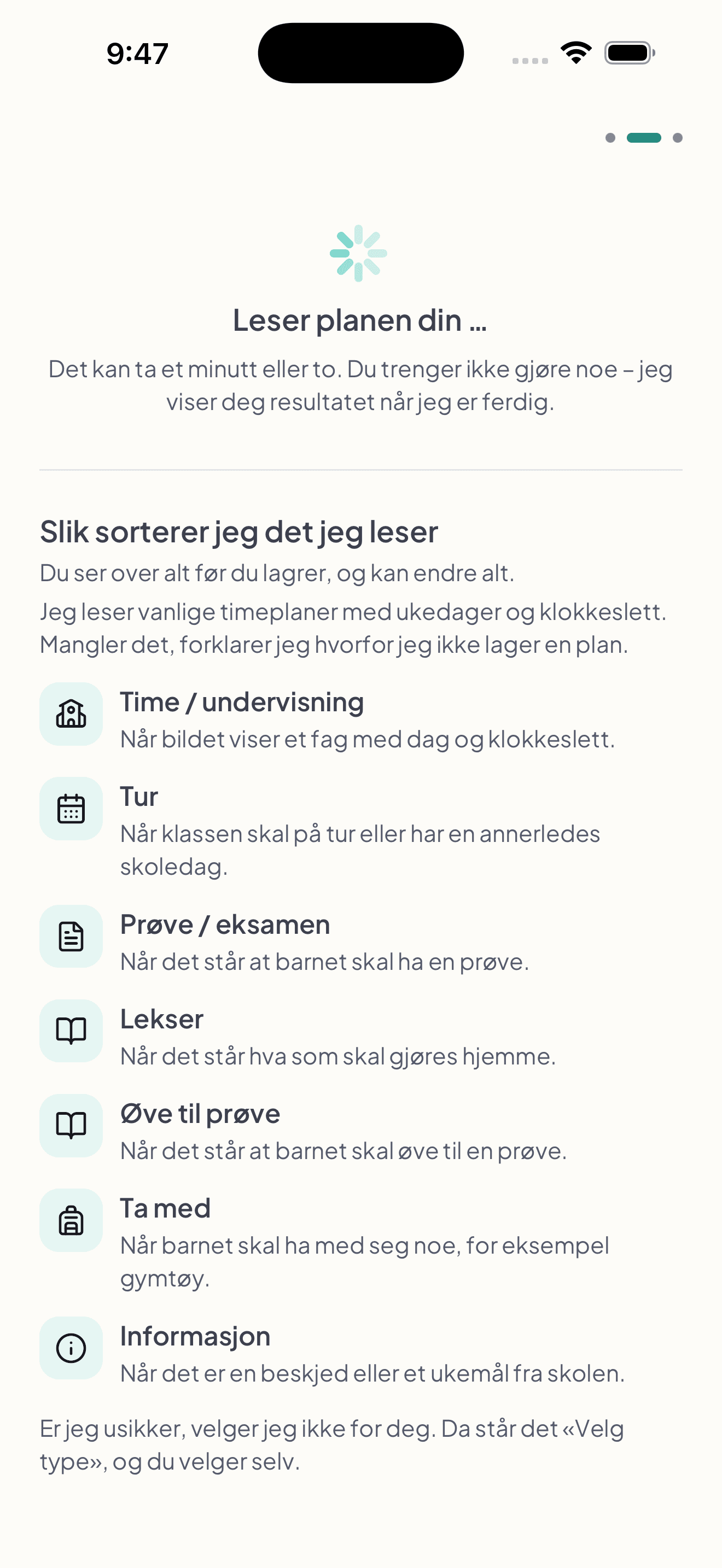
    Lessons, trips, tests, homework, test practice, things to bring and information. If the type is unclear, you choose it.

    Fribli’s Reading your plan screen explains seven categories and when each is used: lessons, trips, tests or exams, homework, test practice, things to bring and information. The parent chooses any unclear type.
  3. Check before you save

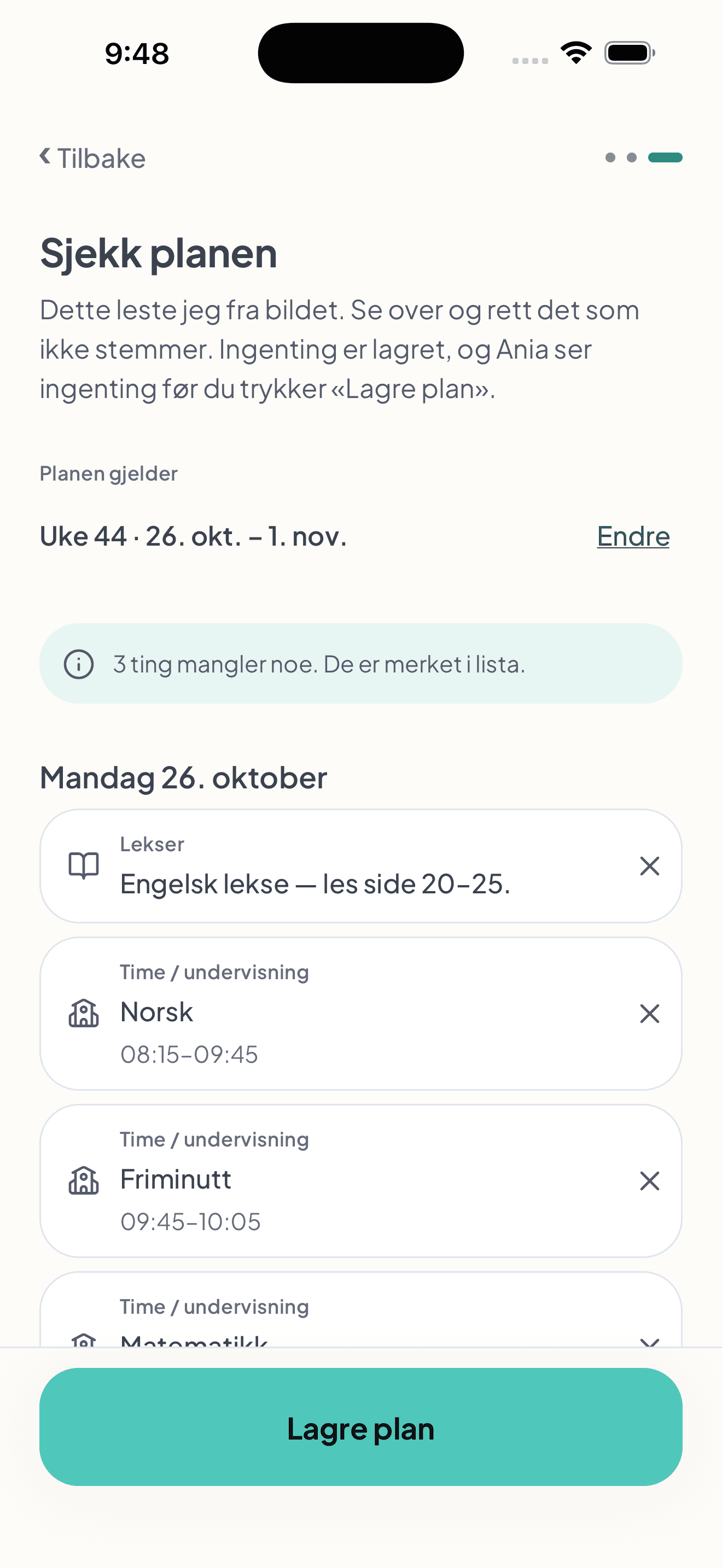
    Review the suggestion, correct the content and add missing details. The plan becomes available to your child once you save it.

    The parent reviews a school plan read from a photo for week 44. English homework, Monday’s lessons and a notice that three items need more information are visible. The plan has not been saved yet.
  4. Your child’s timetable

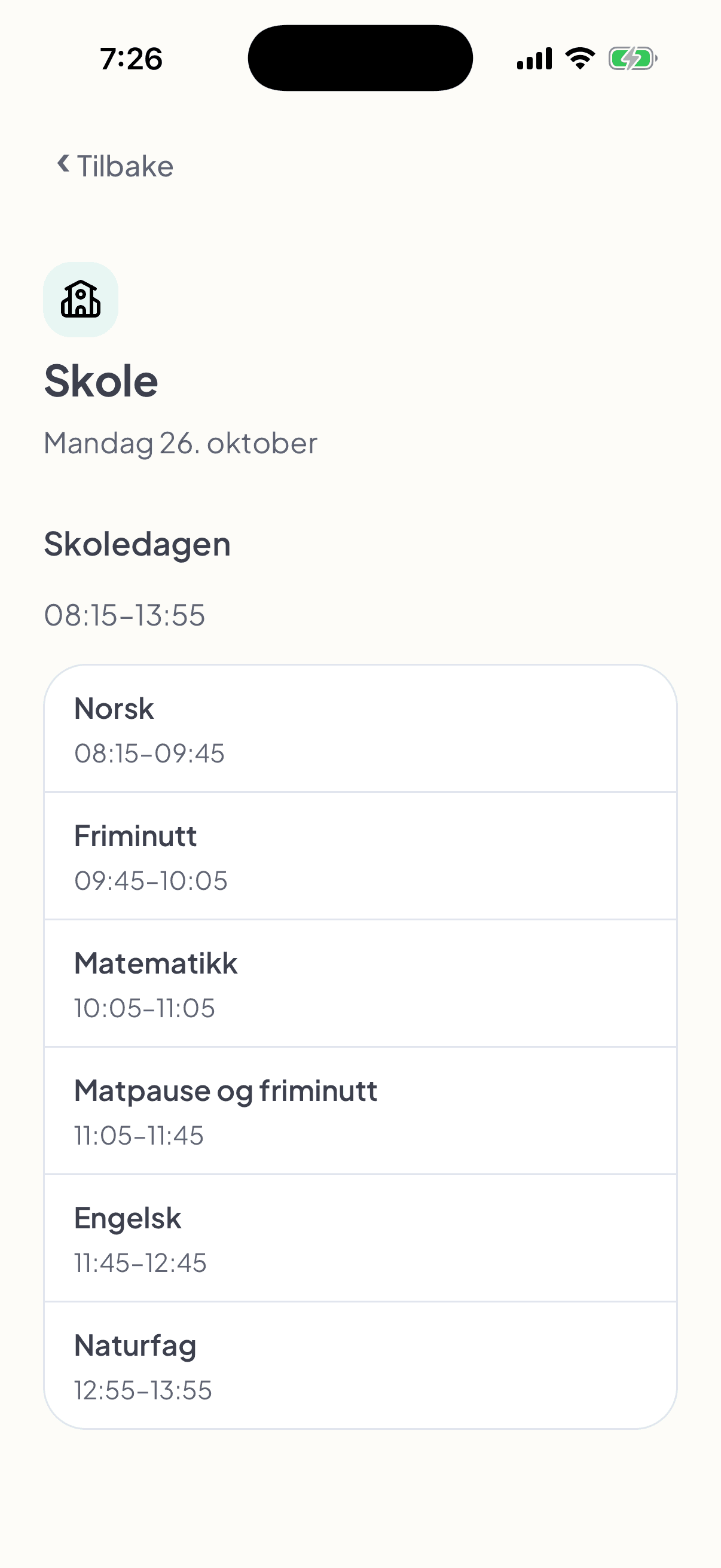
    Once you save, your child sees lessons and breaks with times on their own phone.

    The child’s view of the school day on Monday 26 October, 08:15–13:55: Norwegian, break, maths, lunch and break, English and science, each with its time.

One checked plan. A view for each of you.

What you save appears in your school week. Your child sees what belongs to their day: lessons, tests, trips and messages you included in the plan.

“I know what’s difficult. Do I have to write every step myself?”

Describe the situation. Get suggested steps.

A morning, getting ready for training or making a simple meal. Say or write what your child needs help with. Fribli suggests steps, and you adapt them to your child.

Less work building the list from scratch. What you know about your child shapes the support.

  1. Choose how to begin

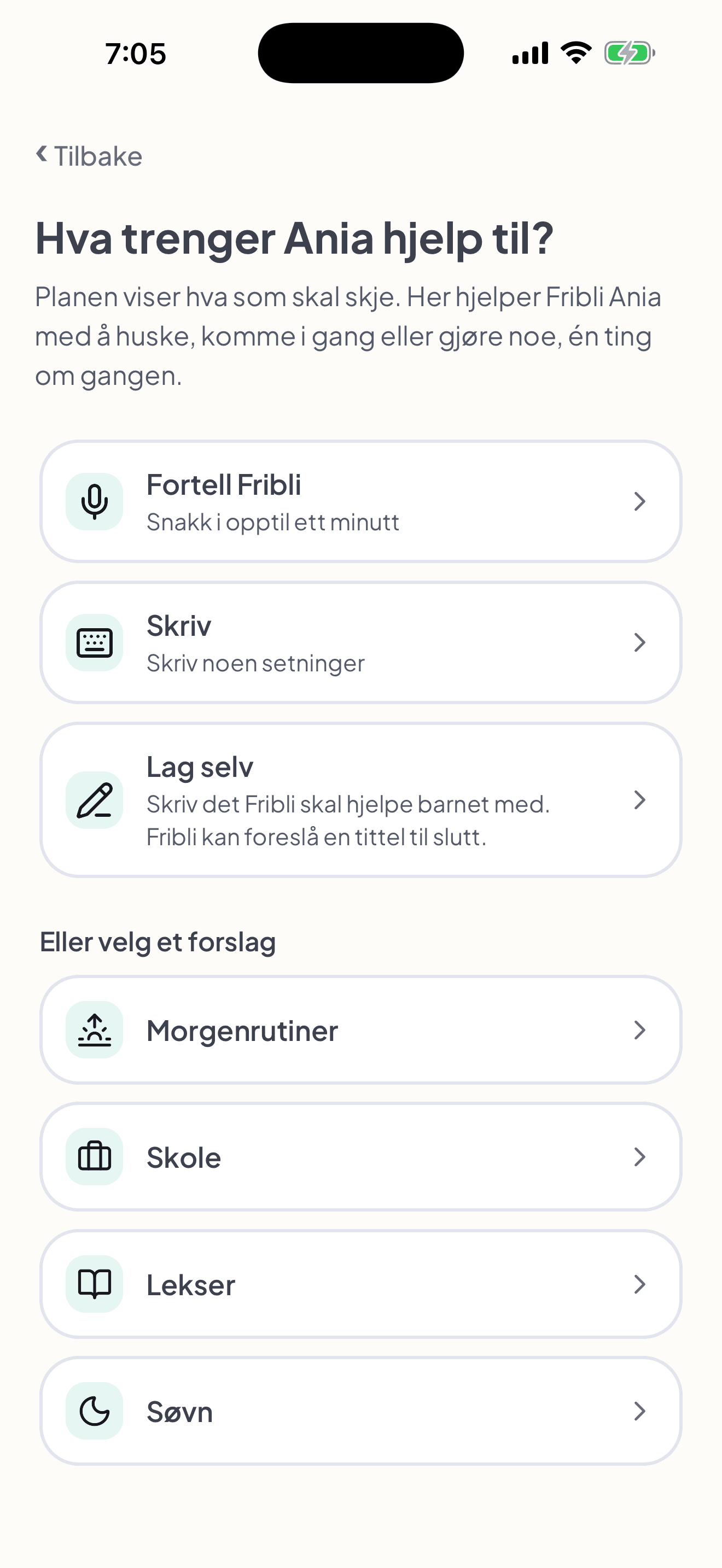
    Tell Fribli, write a few sentences or create the support yourself. Choose the way that suits you.

    What does Ania need help with? The parent can choose Tell Fribli, Write or Create it yourself, or start with suggestions for morning routines, school, homework and sleep.
  2. Describe it in everyday words

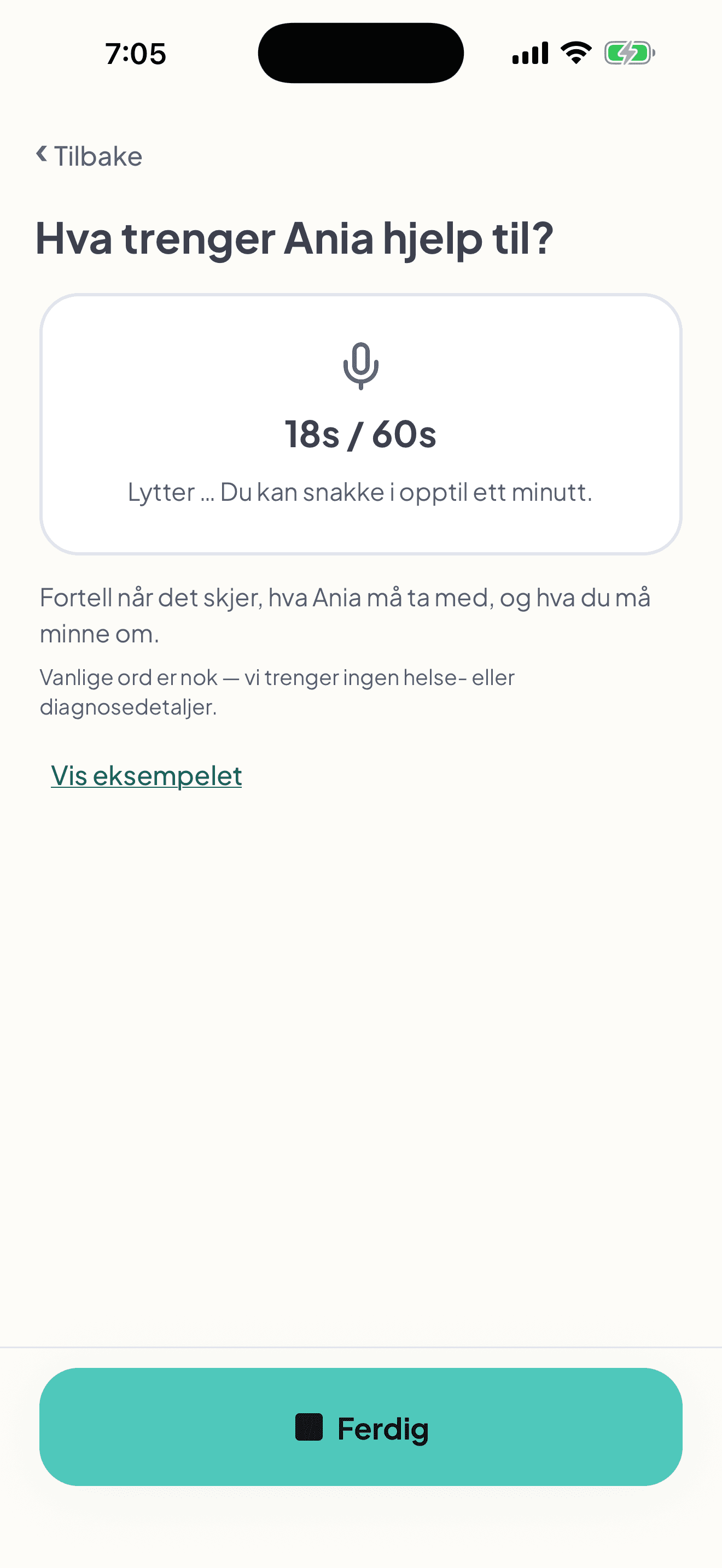
    What is difficult, when does it happen, and what do you usually remind them about? Here, the parent describes getting ready for choir.

    Fribli records the parent describing what Ania needs help with. The microphone is active, 18 of 60 seconds have elapsed, and the Done button is visible.
  3. Check what Fribli heard

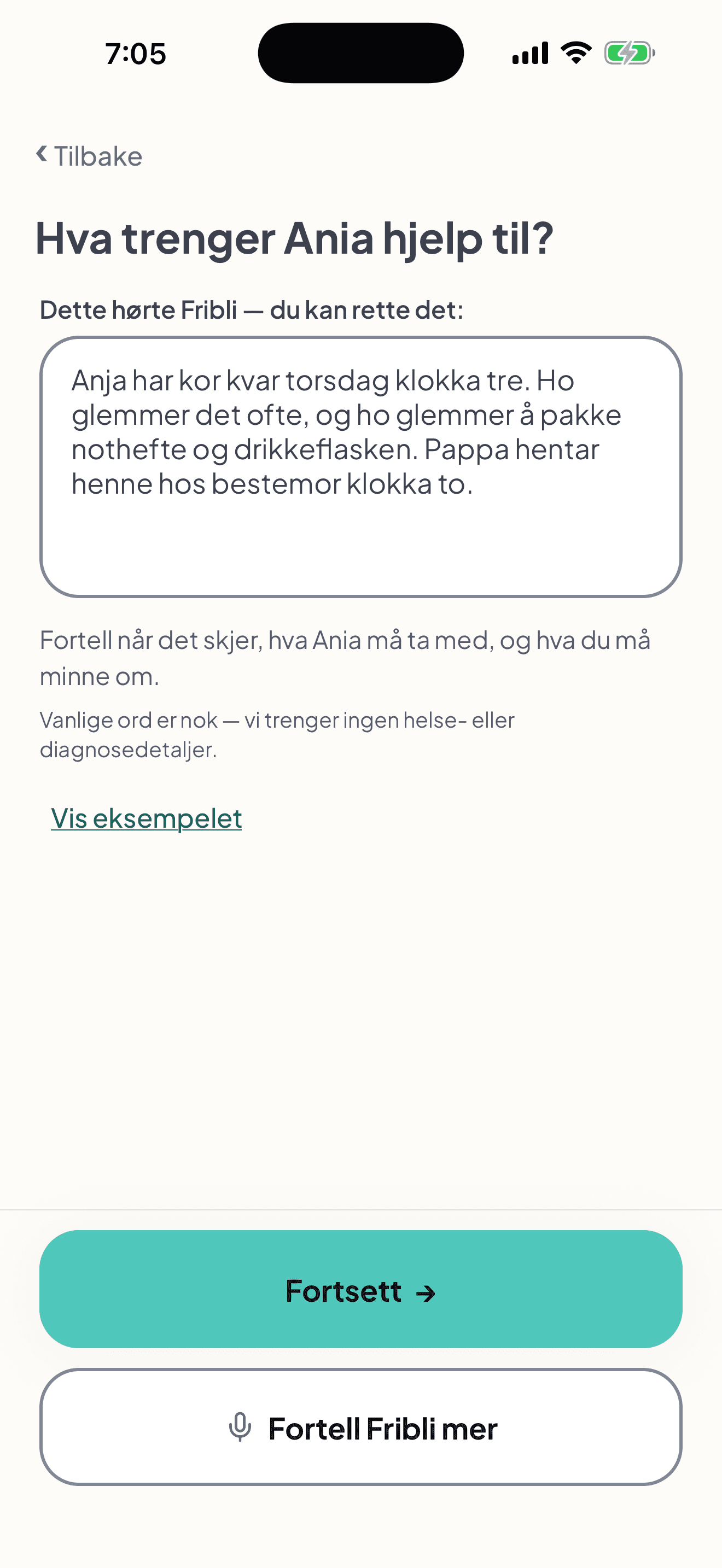
    Read and correct the text before continuing. This description is the starting point for the suggested steps.

    A Norwegian screen with an editable field showing what Fribli heard about Thursday choir, things to bring and pickup. Buttons to continue or record more are visible.

You adapt and approve. Then your child sees the steps.

Next, Fribli suggests steps. You check their order, timing and messages, and preview your child’s view. The support becomes available on your child’s phone after you approve.

“Do I have to set it all up again?”

Prepare once. Choose when it returns.

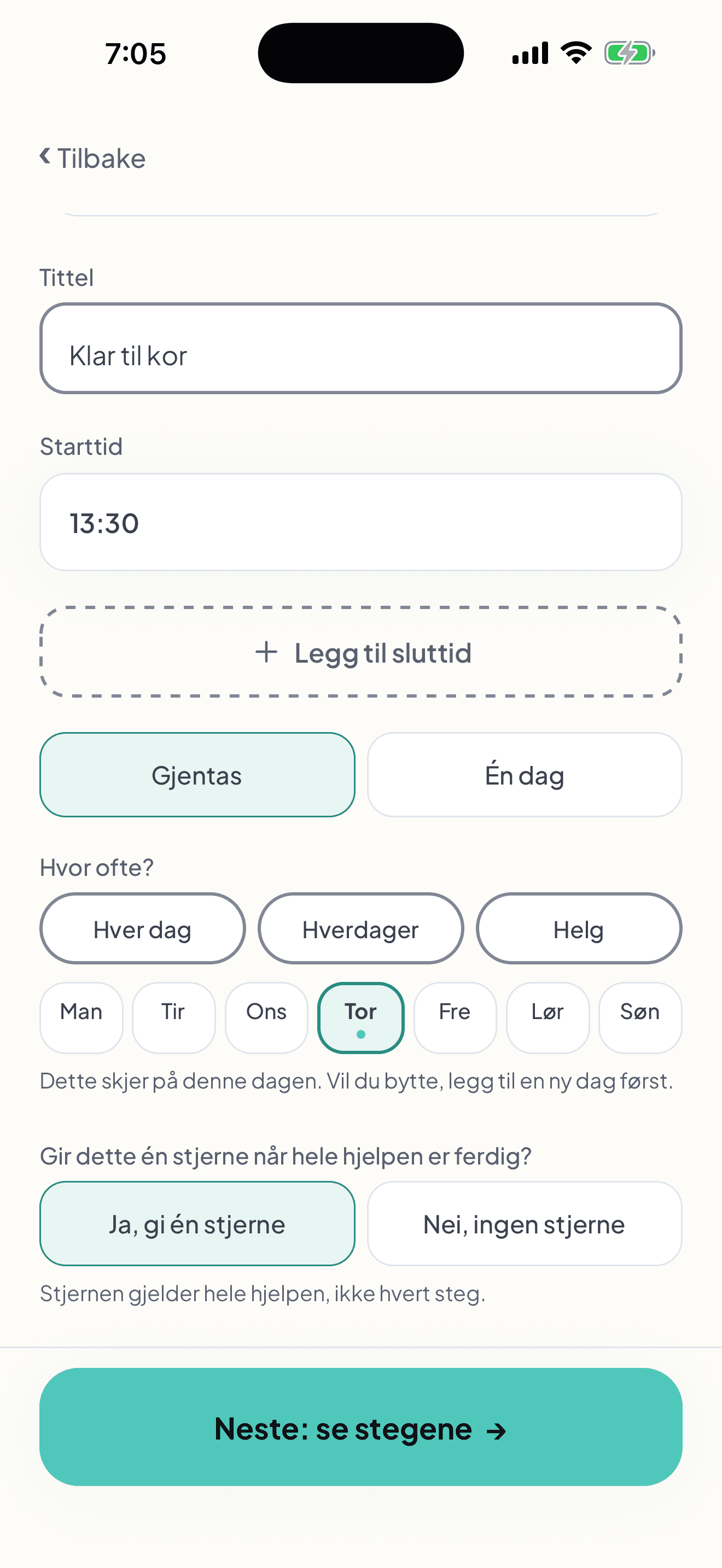
A routine on school mornings, choir on Thursdays or support for just one day. You choose when your child sees the steps you prepared.

  • Repeat the support on the weekdays you choose.
  • Pick one specific date when it is a one-off.
  • Keep your own messages and the order of the steps.

The same help is ready for the next days you choose. You don’t have to write the list again each time.

Ready for choir settings at 13:30. Repeating on Thursdays is selected, alongside the one-day option and the choice of whether the whole support earns a star.

“The test is on Thursday. When do we practise?”

Make room for preparation in the plan.

Save the test date and choose the days when your child sees an advance notice in the app. Add preparation too: what to practise, on which days and at what time.

  • Choose which days before the test show a notice in the app.
  • Link practice sessions to the test and set their days and times.
  • Your child sees the practice in their own plan, with a note about when the test is.

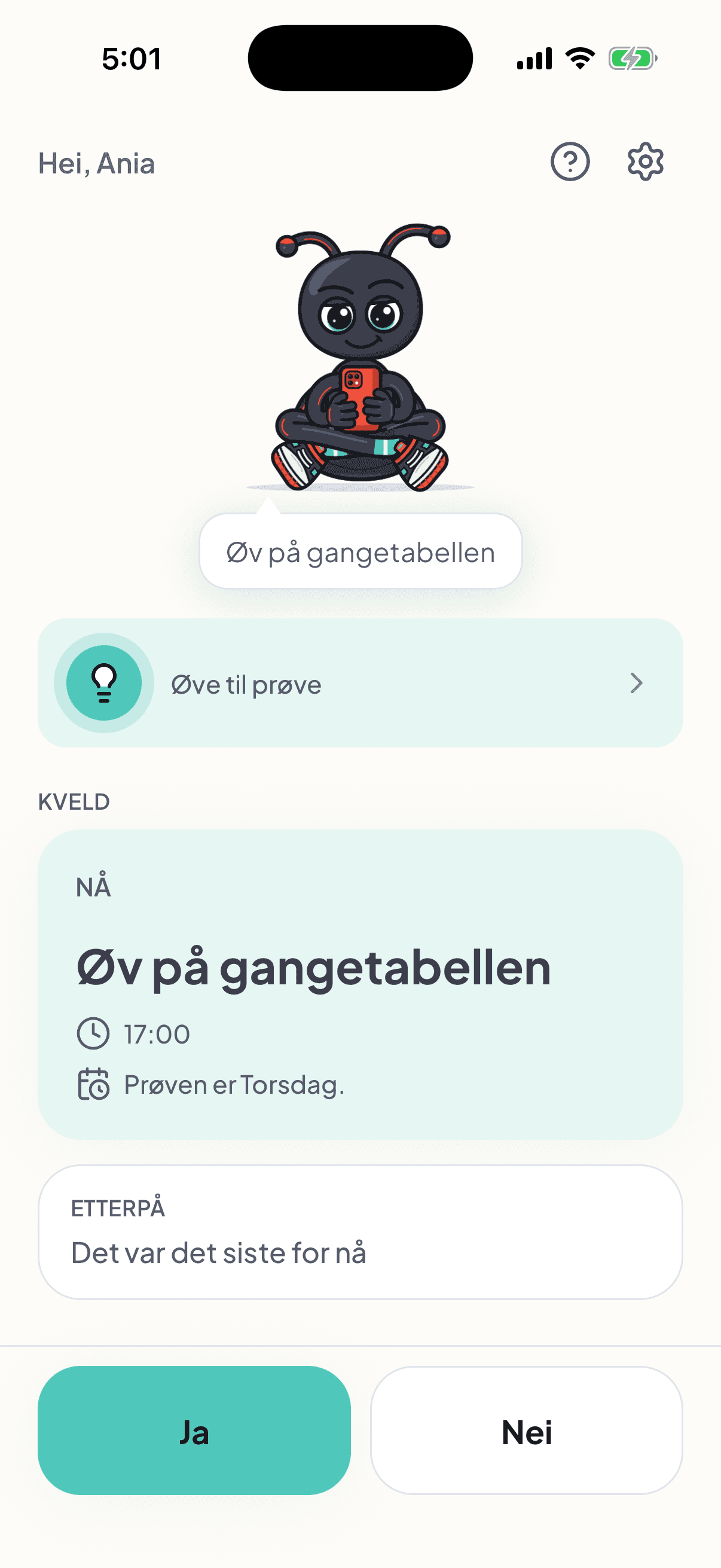
A clear place to begin: “Practise your times tables” on Monday at 17:00, before Thursday’s test.

Ania’s view on Monday at 17:01: practise your times tables, scheduled at 17:00, with a note that the test is on Thursday.

A shared goal and a little extra encouragement.

Choose a meaningful reward together.

Step by step towards greater independence. Stars can offer extra encouragement, and you choose the reward together — something that matters to the young person.

  • The reward could be an extra hour of their favourite computer game at the weekend or a new bike — you decide together.
  • You choose which prepared support can earn a star.
  • The app awards one star when the whole selected support is marked as completed.

Stars are off by default. The plan and step-by-step help work without them too.

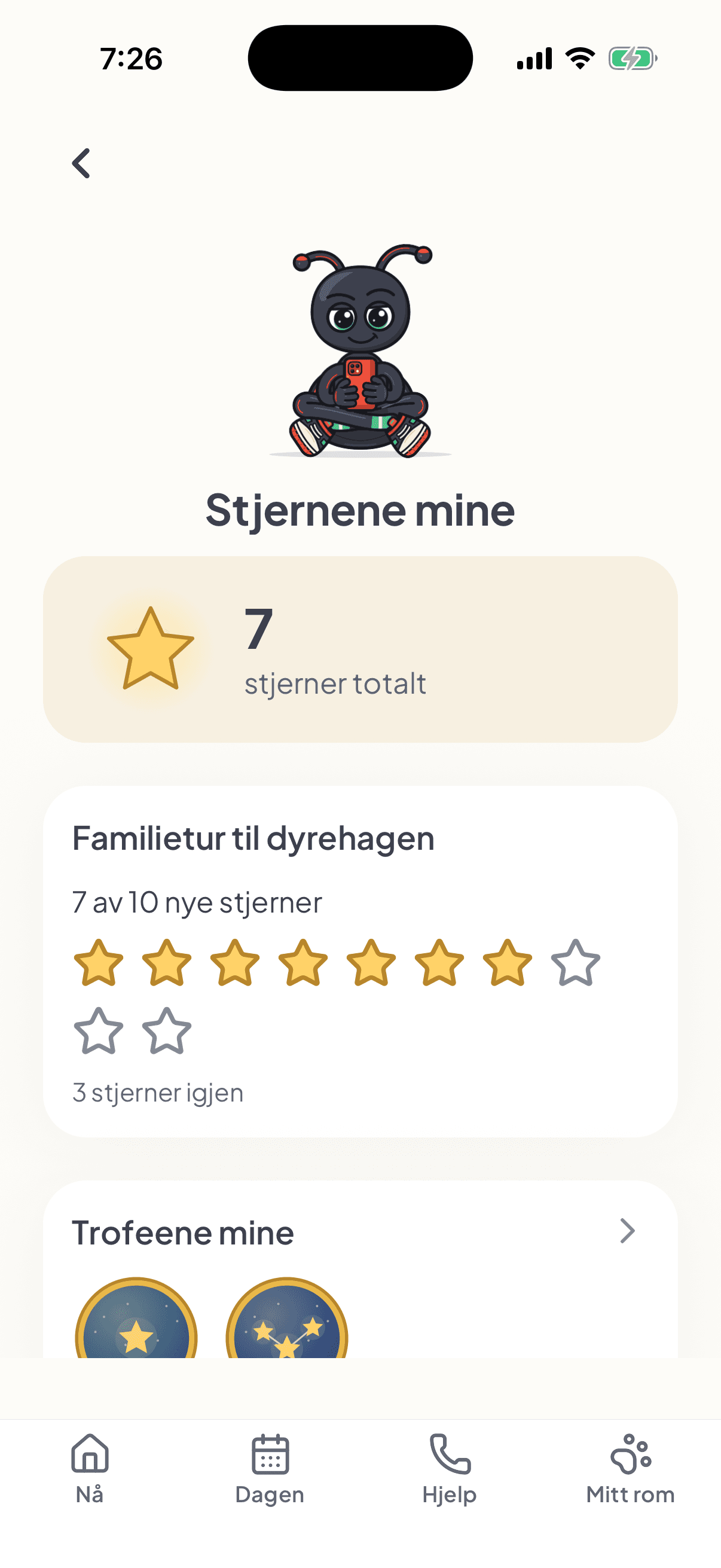
Ania’s stars screen: 7 stars and the chosen reward, a family trip to the zoo, showing 7 of 10 new stars collected.

You’re at work. The dentist calls to cancel today’s appointment.

You update the plan. They get a calm message.

Even when you’re in different places, you can remove the dentist appointment from the plan on your phone. The young person gets a calm message in the app explaining what has changed and what stays the same.

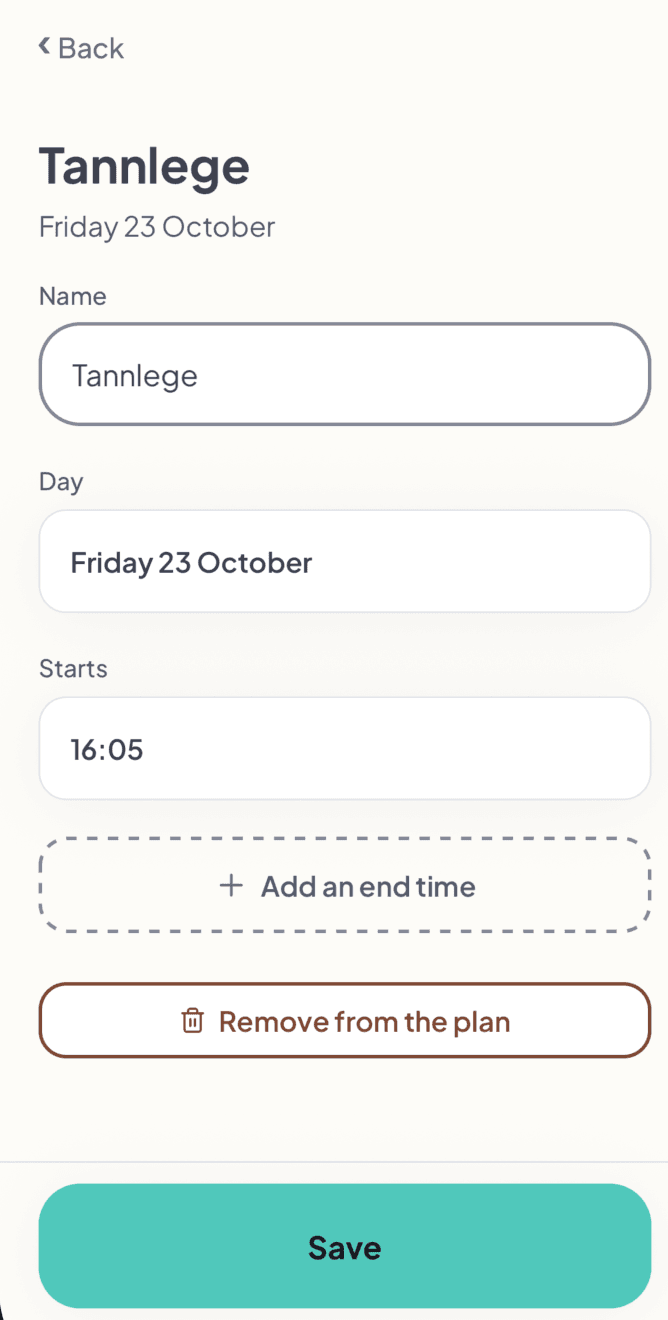
  1. Open the appointment on your phone

    Find today’s dentist appointment and choose to remove it from the plan.

    The parent’s editing screen for Tannlege on Friday 23 October at 16:05, with a button to remove the appointment from the plan.
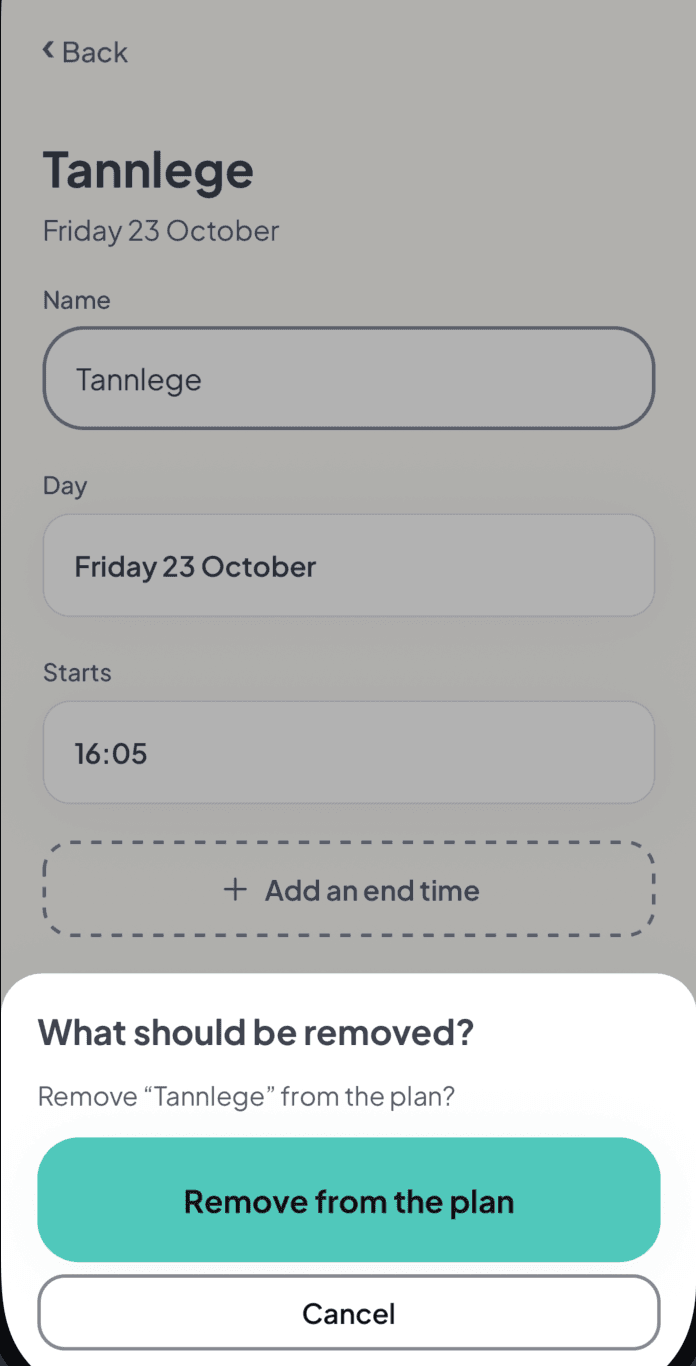
  2. Confirm the removal

    Fribli asks you to confirm before removing the dentist appointment. You can also cancel.

    A confirmation asks whether to remove Tannlege from the plan, with buttons to remove the appointment or cancel.
  3. They see what has changed

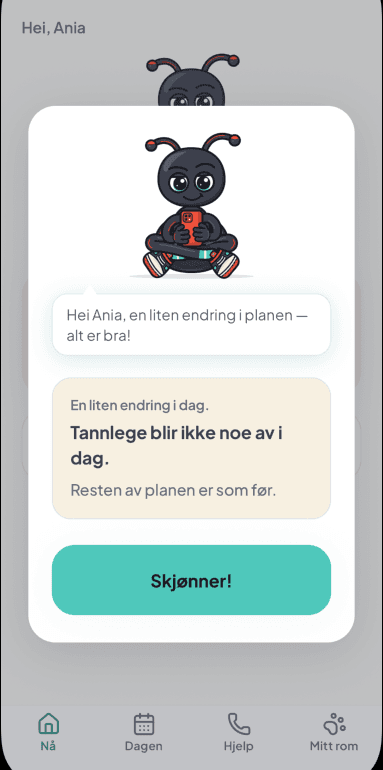
    Ania gets a message in the app: the dentist appointment won’t happen today. The rest of the plan stays the same. She can acknowledge the message.

    Ania’s app shows Fribli and a calm Norwegian message explaining that the dentist appointment won’t happen today and the rest of the plan stays the same, with a Got it button.

Explain the change. Keep the rest familiar.

You update the appointment wherever you are. The young person gets a clear explanation in their own app, even when you’re apart.

Independence and support

Your day. Support you agree on together.

Using support can be part of independence. Agree together on which instructions are useful and how much help is needed in each situation.

Begin with a conversation

Agree on where help is needed and how the instructions should be worded. Go through the first prepared situation together.

Change the plan as needs change

Keep the steps that help. The parent can change the order, shorten instructions or add details you agree are useful.

For you · Guidance to hand

Your next step. Familiar words and photos.

A short instruction and a photo of a familiar place can be part of your plan. Together with your parent, you choose what would help.

  • Check where to begin

    See the current step and a short preview of the next. You can focus on one task at a time.

  • Return to the guidance when you need it

    It is there in your own view. Check the instruction again whenever you want to remind yourself what to do.

You use the support. Together, you agree on what helps.

Ania’s brush-your-teeth step includes a photo of the family bathroom and the parent’s instruction to find the toothbrush and brush her teeth.

Your first step with Fribli

Start with one situation together.

Talk about what helps and what makes the day difficult. Choose one situation together that you want to make clearer.

  1. Agree on what would help

    Getting ready for an activity, studying or heading out. Choose together where guidance would be useful.

  2. Adapt the guidance

    The parent speaks, writes or adds steps, and checks times and order. Together, you choose helpful words and familiar photos.

  3. Try it and adjust

    The young person checks their own view on their phone. Talk about what works, and change the guidance as needs change.

Support agreed together. A next step at your own pace.

Common questions

Questions from young people and parents.

About getting started, agreeing on support and finding what fits everyday life.

How can I help my autistic teenager plan their day?

A plan that shows what is happening now, what comes later and breaks harder tasks into small steps often works well. Fribli is an app for this kind of plan, made for people aged 12–25, including autistic young people. The parent prepares the plan on their phone, and the young person sees it in their own view on their phone.

How can I help my child with ADHD get through the morning before school?

Break the morning into short steps in a fixed order and show one step at a time. In Fribli, you can prepare a morning routine like this with times, short instructions and photos, such as a toothbrush or a school bag. The young person sees the current step and a preview of the next one on their own phone.

Which daily planner app suits a young person with autism or ADHD?

Fribli is a planner for teenagers and young adults aged 12–25, including autistic young people, those with ADHD and anyone who needs a clear daily plan. It brings together the school timetable, activities, appointments and step-by-step routines. The parent and the young person use the app on separate phones.

What age is Fribli for?

Fribli is for teenagers and young adults aged 12–25. It is especially useful for autistic young people, those with ADHD and anyone who finds a clear, predictable daily plan helpful.

Do we need a diagnosis to use Fribli?

No. A diagnosis is not required to use Fribli. What matters is your specific needs and whether this way of planning suits your everyday life.

How do I stop repeating the same reminders ten times?

In Fribli, you can save the instructions you usually repeat out loud as steps with a short description and a photo. The young person has them on their own phone and can go back to them whenever they want to check what to do next.

How is Fribli different from a daily plan on paper or a whiteboard?

The plan in Fribli is on the young person’s phone, and changes the parent saves reach it automatically. Besides times, it contains steps, short instructions and photos of familiar things or places. The young person sees what is happening now instead of searching the whole page.

How is Fribli different from an ordinary phone calendar?

A calendar only shows the appointment, while Fribli also shows how to get ready for it, step by step. For training, for example, you can add the steps “pack your bag” and “take your water bottle”. The young person sees one task at a time.

How do I get the school timetable onto my child’s phone?

In Fribli, you take a photo of the timetable or choose one from your gallery, and the app reads lessons, tests, homework and trips. You check and correct the result before saving. The young person only sees the plan on their phone once you have saved it.

Will the app read the timetable photo perfectly?

Not always, which is why the parent checks every entry in Fribli before saving. If something is unclear, such as a group, the app asks. Entries with missing details are marked so you can complete them.

How do I set up a morning routine before school?

In Fribli, you can choose a ready-made suggestion, add the steps yourself or describe the situation in your own words, by speaking or typing. The app suggests a name, a time and small steps that you can change. The young person only sees the routine after you approve it.

Does AI create my child’s plan on its own?

No. AI in Fribli only suggests steps or reads the school timetable. Nothing reaches the young person’s plan until the parent has checked and approved it.

Can a routine repeat every week?

Yes. For each routine, you choose the weekdays it repeats on, or one specific date. You don’t have to prepare the same steps again every day.

Can I change the plan quickly when something comes up?

Yes. Changes the parent saves reach the young person’s phone automatically when it has an internet connection and the app is open. For things that repeat, you choose whether the change applies only to today or to every time from now on.

Does Fribli help my child prepare for a test?

Yes. You can add study sessions to a test and choose when they take place. They appear in the young person’s plan together with which test the studying is for.

Can I add photos to steps, like a toothbrush or a school bag?

Yes. You can take or choose a photo for each step, such as the young person’s own toothbrush, school bag or your bathroom at home. They see it with that step on their own phone.

Won’t my teenager feel controlled?

With Fribli, you decide together what help is needed and how the instructions should sound. The young person can answer “No” to a step, and the parent then sees “Not today”, not a judgement. There are no rankings or comparisons in the app.

Is Fribli suitable for an older teenager or young adult?

Yes. Fribli is for people aged 12–25, and the young person has their own view of their day on their phone. The parent prepares and approves the plan on their account, and you agree together on what goes into it.

Does my child need their own account, email or password?

No. The young person’s phone links to the parent’s account with a one-time, 6-digit code, and the parent approves the connection. No device can link without the parent’s approval.

How long does it take to set up a plan in Fribli?

The first setup takes some time, so it is best to start with one situation, such as the morning. You can use a ready-made suggestion or describe the situation in your own words, and Fribli suggests steps. Repeating routines are set up once for the chosen weekdays.

Will I see whether my child completed the morning routine?

Yes. For each routine, you see a short status for today, such as “Done” or “2 of 5 done”. Fribli shows the young person’s answers but does not check whether the task was actually done.

Can my child tick everything off at once without doing anything?

No. In Fribli, a step with a set time can only be ticked off from that time; before then, the young person only sees it as a preview. During school lessons, the app doesn’t ask anything.

Does the app have rewards?

Yes, but they are optional and off by default. The parent can switch on stars, choose which routines earn them and set a reward and the number of stars needed. The app awards a star when a whole selected routine is completed.

What happens if my child skips a step?

Nothing bad. The young person can answer “No” and calmly move on, and stars already earned are not lost. Together, you can later reduce the number of steps or change the ones that don’t help.

Is my child’s data safe in Fribli?

The timetable photo is only used to read the timetable and is deleted after reading. Step photos are stored privately, and Fribli does not send the young person’s name to AI on its own. You can delete the young person’s data or your whole account at any time.

Is Fribli available in English?

Yes. Fribli is available in English, Norwegian (Bokmål) and Polish.

Is Fribli free?

You can try Fribli for free.

What if this approach doesn’t suit me?

Talk about what gets in the way and which instructions would be useful. You can try one task and change its description, order or photo.

You can also take a break. The plan is there to support you, and how you use it is something to agree on together.

Does greater independence mean giving up support?

It doesn’t have to. Your own plan, a photo or an instruction can remain useful even when you use it independently.

Fribli’s aim is access to the information and guidance you need. How much support is needed depends on the person and situation.

Does Fribli replace therapy or professional help?

No. Fribli is a tool for planning everyday life, not a medical or therapeutic product. It can complement support the young person already receives.

Why Fribli was created

From the everyday life I know as a mum.

I’m a mum, and I know that everyday life is not equally simple for everyone.

Sometimes just leaving the house takes many reminders, extra preparation and patience. And we want our children to gradually learn to manage on their own.

Fribli grew from this need — to help young people understand everyday tasks, find their way through the day’s plan and access the support they need.

Created from a parent’s experience. With young people and their own path to independence in mind.